Meta description: 10 tips for an irresistible meta description!
 Joram BoonSEO and content specialist
10 July 2024 · updated 24 June 2024
You only have a few seconds to make an impression! Those precious seconds decide whether a searcher clicks your link or keeps scrolling. So how do you grab that attention? An irresistible meta description together with a rock-solid SEO title.
Meta descriptions are like mini adverts for your pages. They're small but mighty, and they can make the difference between getting clicked and getting ignored. A well-written meta description grabs a searcher's attention and gets them to click your link instead of a competitor's.
Imagine every search on Google leading to clicks on your site, because your meta descriptions hit exactly the right note. That means more visitors, more conversions and more revenue.
Does that sound good to you?
In this blog I'll share 10 tips to help you write perfect meta descriptions. Learn how to use keywords effectively, write copy that grabs attention, and stick to the right length.
Keep reading and discover how to write rock-solid meta descriptions!
What is a meta description?
A meta description is a short piece of text that appears below the title of your web page in the search results of search engines such as Google. This description gives a concise summary of the page's content and is meant to help users work out whether the page is relevant to their search.

Why does a meta description matter?
- Attracting clicks: a well-written meta description can catch people's attention and encourage them to click your link. This increases the chance they'll visit your website.
- SEO benefits: although meta descriptions themselves have no direct influence on the search results (SEO), they can help indirectly. A higher click-through rate (CTR) can contribute to a better ranking in the search results. More on that shortly…
- First impression: the meta description gives a first impression of your page's content. A clear, appealing description can convince people faster that your page has the information they're looking for.
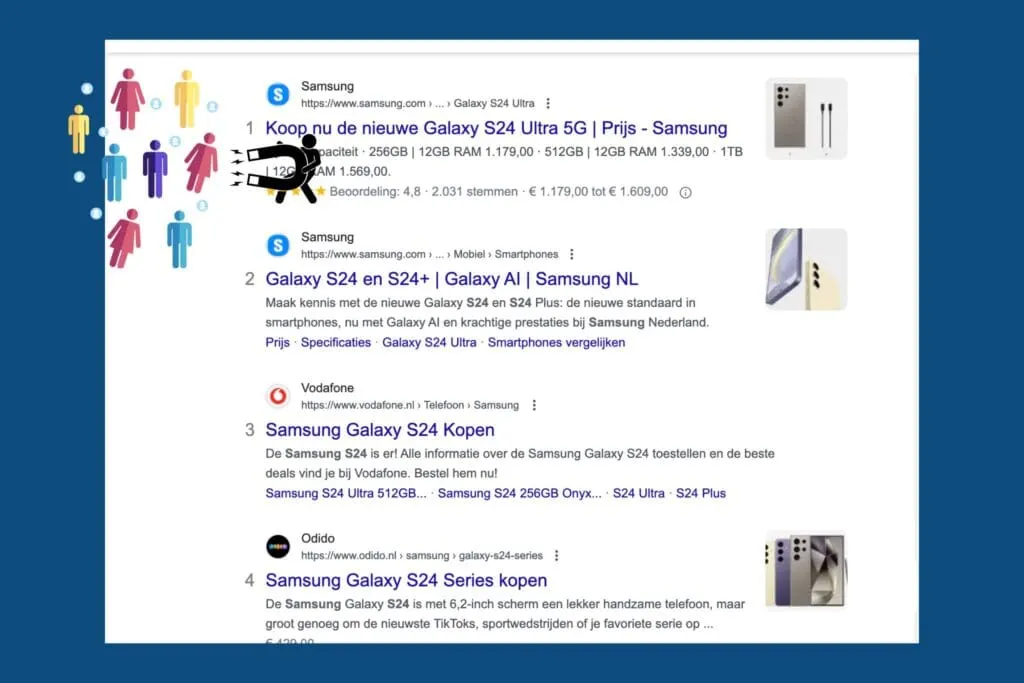
Does the meta description directly affect SEO?
The meta description doesn't directly affect your ranking. Google doesn't use the words in the meta description to determine your ranking. This is explained clearly in a blog post from Google itself: Google's blog on the use of meta descriptions in Google's search results.
Although the blog post is in German, the video is in English and explains that Google increasingly uses the meta description for search results, but that it has no effect on how high you rank.
A good meta description can raise your click-through rate (CTR). That means more people click your link in the search results. If these visitors stay on your website and don't quickly bounce back to the search results, this sends a positive signal to search engines.
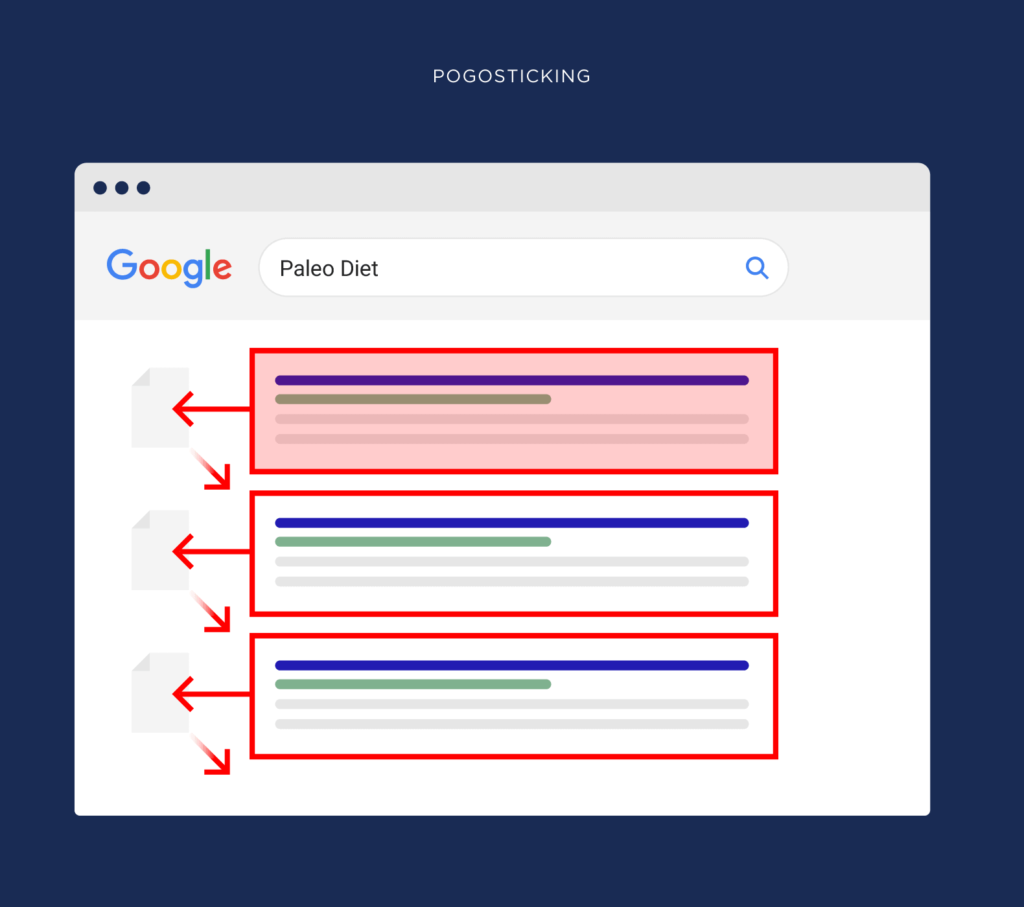
Quickly heading back to the search results after clicking on one of the websites is known in the SEO world as 'pogosticking', and if this happens a lot with one of your pages, it's a bad signal for search engines.
It shows how well the page satisfies the need behind the user's search. The fewer people who bounce back, the better for your SEO.
10 tips for an irresistible meta description!
Still use your most important keyword.
When someone searches on Google and your meta description contains the exact keyword they used, that keyword is shown in bold.
This grabs the searcher's attention because it matches their search exactly. If your meta description contains the keyword people are searching for, your link stands out immediately.
EXTRA TIP! Put your keyword as far to the left as possible…
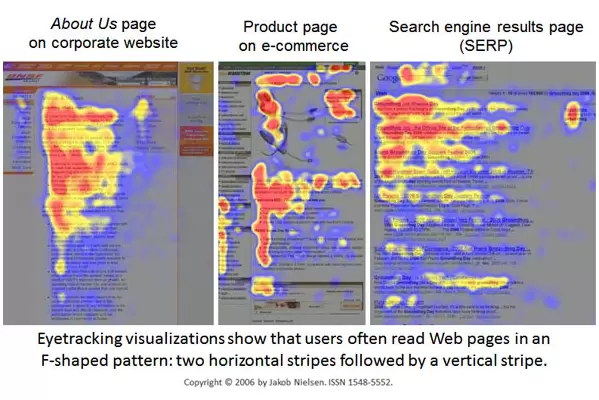
People tend to scan the first few words of a piece of text first. This is because they often read in what's known as an F-pattern. They first look horizontally across the top lines of the text, then follow a vertical line down the left-hand side of the text.
This means that if you put the most important keyword at the start of your meta description, it stands out faster and grabs more attention. That's because people read the first few words first, and only then start scanning the rest.
Example:
Say you run an online store that sells sneakers, and your most important keyword is "white sneakers". A good meta description could be:
"White sneakers – stylish and comfortable! Discover our extensive collection of top brands. Free shipping on orders over €50."
Here you use the most important keyword "white sneakers" at the start of the description, which helps grab attention and boost your CTR.

Now that you know how to use your most important keyword effectively, it's also critical to manage the length of your meta description properly. In the next section we'll cover why you shouldn't go over 155 characters.
Don't go over 155 characters
A good meta description shouldn't be longer than 155 characters. Why? Because search engines such as Google only show a limited number of characters. If you use more than 155 characters, your description gets cut off and a "…" appears at the end. This doesn't look professional and can put people off clicking through.

Here are a few tips to help you stay within the 155-character limit:
- Be concise: choose your words carefully. Use short, punchy sentences. And use power words such as 'discover', 'learn now', 'free'.
- Use abbreviations: but only when they make sense and don't change the meaning.
- Avoid unnecessary words: every word should add value to your description.
Fortunately there's a handy tool that can help you with this: the Yoast SEO plugin. This is a free plugin for WordPress that helps you write the perfect meta description. Yoast gives you a clear overview of the number of characters you've used and warns you when you go over the limit.
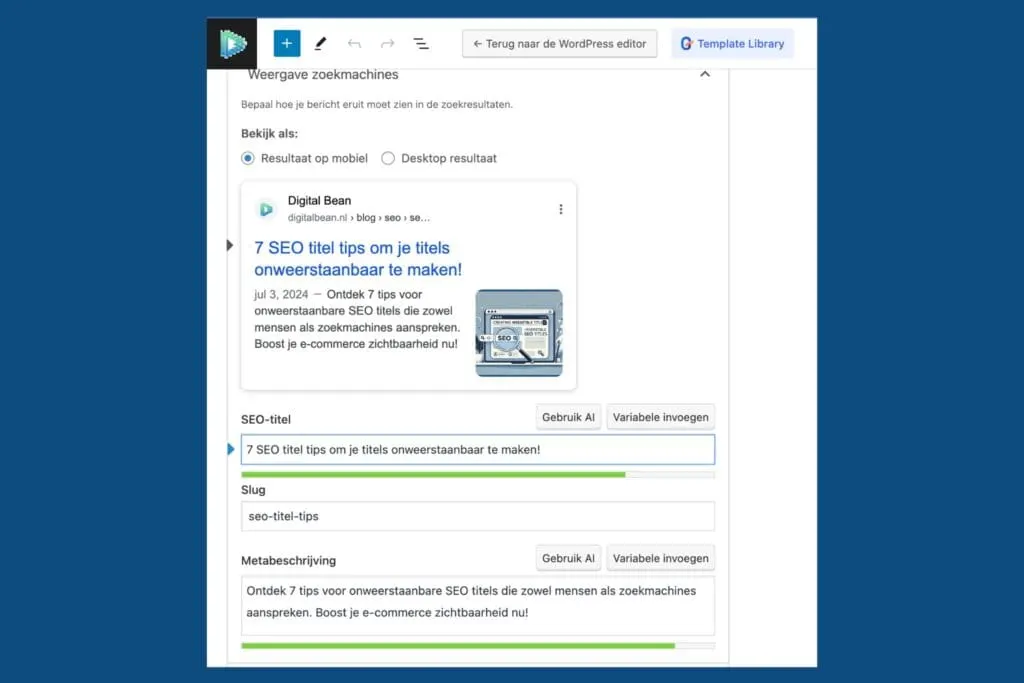
Now that you know how to stay within the 155-character limit, it's time to look at the tone of your meta description. Be active! Using active language can make your description more appealing and encourage more people to click through.
Be active!
Writing actively makes your meta description powerful and appealing. Why? Because it speaks to your reader directly and motivates them to take action. Let's look at how you can do that.
Use active verbs Active verbs make your text feel lively and energetic. Instead of saying "Our products are sold at a discount", say "Buy our discounted products now". See the difference? The first sounds dull and passive, while the second is direct and inviting.
Tell them what's in it for them: use 'you' and 'your' People want to know what's in it for THEM. By using words like "you" and "your", you make the text more personal and appealing. For example, instead of "This tool helps with SEO", say "This tool helps you improve your SEO". This makes the reader feel spoken to directly and more involved.
Avoid passive sentences Passive sentences are dull and vague. Compare "A free trial is offered" with "Try it free now!". The second sentence is clearer, more direct, and encourages the reader to take action.
By writing actively, you don't just make your meta description more appealing to readers. In the next section we'll look at how to give enough information, without giving everything away.

Give enough information, but not too much
When writing a meta description, it's important to find the right balance between giving enough information and sparking curiosity. You want people to know exactly what to expect on the page, but you also want them curious enough to click through.

- Be clear
Let people know what they'll find on the page. If you have a blog about the best smartphones of 2024, make that clear. For example: "Discover the top 10 smartphones of 2024 with in-depth reviews and buyer's guides." - Spark curiosity
Alongside clarity, you also need to spark curiosity. Give a hint about what the user will learn or find without giving everything away. For example: "Read on to find out which smartphone has the best camera, and why." - Avoid unnecessary details
Don't try to cram everything into the meta description. Keep it concise and relevant. Give only the most important information and leave the rest to the content of the page itself. For example: "Top 10 smartphones of 2024 – in-depth reviews, buyer's guides and more."
By finding this balance, you give the user just enough information to know what the page is about, while leaving enough open to spark their curiosity.
Now it's time to learn how to highlight the benefits of your product or service. This helps make your meta description even more appealing to potential customers. Let's carry on!
Highlight the benefits of your page
When writing a meta description, it matters a great deal to clearly bring out the benefits of your product or service. People want to know what's in it for them, and why they should visit your website specifically. Here are a few concrete tips:
- Be specific: tell them exactly what they'll get. Instead of "Good shoes," you could say "Comfortable running shoes, boost your performance now!"
- Solve a problem: show how your product or service solves a problem. For example, "Lose weight with our 30-day fitness plan."
- Unique features: what makes your product different? Highlight unique features such as "100% organic ingredients." This is your unique selling point (USP)
- Make it personal: use words like "you" and "your" to create a direct connection with the reader. For example, "You deserve the best smartphone experience." We already covered this above.
- Add a benefit: mention a specific benefit, such as "Free shipping over €50."
- Create urgency: use words that create a sense of urgency, such as "While stocks last" or "Limited edition."
By clearly communicating these benefits, you not only grab the attention of potential customers, you also make them curious for more.
They want to know how your product can make THEIR life better. Highlighting the benefits can be the nudge that gets them to click through to your website, increasing the chance that they'll make a purchase or get in touch with you.

Now it's time to learn how to match the meta description to the type of page it appears on. Let's look at how to do this for blogs, category pages and product pages.
Match the description to the type of page
It's important to know that different types of pages need different types of meta descriptions.

Here's how you tackle it:
1. Blog pages
For blog pages, the meta description should summarise the content of the article and spark curiosity.
Example: say you have a blog post about "The best SEO tips for beginners". Your meta description could be: "Discover the top 10 SEO tips for beginners and boost your website traffic. Learn how to rank higher on Google fast!"
Here you use the main keyword ("SEO tips for beginners") and make the reader curious about the content.
2. Category pages
To optimise category pages, you need meta descriptions that explain what kind of products or services can be found in that category.
Example: say you have a category page for "running shoes". Your meta description could be: "Find the best running shoes for every surface and every distance. Free shipping on orders over €50!"
Here you clearly state what customers can expect (running shoes) and give an extra incentive (free shipping).
3. Product pages
For optimising product pages, the meta description should focus on the key benefits and features of the product.
Example: "Apple iPhone 15 Pro: experience the power of the new iPhone. With 256GB storage, a razor-sharp camera and an elegant black design. Order here!"
Here you highlight the benefits and features (256GB storage, razor-sharp camera, elegant black design).
4. Homepage
The homepage is your website's shop window. The meta description should give an overview of what your business does and why people should choose you.
Example: say you have an e-commerce site that sells electronics. Your meta description could be: "Discover the latest electronics at [Your Business]. From smartphones to laptops, all at great prices. Ordered today, delivered tomorrow!"
Here you give a summary of what you offer (electronics) and a strong reason to buy from you (great prices, fast delivery).
Add a rock-solid CTA
A call-to-action (CTA) is a direct invitation to the reader to take a specific action. Adding a rock-solid CTA to your meta description can make the difference between someone just scrolling past your link and someone actually clicking it.
A good CTA should be clear, concise and motivating. Here are a few tips for adding a strong CTA to your meta description:
- Use action-oriented words: words such as "discover," "buy," "read," and "try" encourage the reader to act right away.
- Make the benefit clear: let the reader know what's in it for them if they click your link. What do they get out of it?
- Create a sense of urgency: use words and phrases that create a sense of urgency, such as "now," "today," or "limited time."
- Be specific: avoid vague terms. Tell the reader exactly what to expect.
- Be concise: keep it short and punchy. You don't have much space, so every word counts.
Here are a few examples of strong CTAs you can use in your meta description:
- "Discover the secrets to a successful meta description now!"
- "Buy today and get 20% off!"
- "Read our guide and boost your SEO right away!"
- "Try it for free and see results instantly!"
- "Download our free checklist now!"
A strong CTA in your meta description drives people to act!
With these tips for a strong CTA, you're ready to optimise your meta descriptions and get more clicks. Let's move on and find out why it matters to give every page a unique meta description!

Create unique meta descriptions for every page
Unique meta descriptions for every page matter a great deal. If you use the same meta description for multiple pages, search engines can struggle to work out which page is most relevant for a given search.
In some cases it can even lead to duplicate content, meaning search engines see the page as a duplicate with the same content.
Unique descriptions help search engines index your pages better and give users a clearer picture of the content. So make sure you write unique, attention-grabbing descriptions for every page!

Now let's look at something not many people talk about, but that still matters. Avoiding quotation marks. Keep reading and find out why this is so important…
Avoid quotation marks!
Don't use quotation marks (" ") in your meta descriptions. Why? Because quotation marks can cause your description to get cut off in HTML.
This means search engines can't read or display your full meta description. This means you miss the chance to make a good impression on potential customers.
Imagine someone finds your site, but only sees half a description. That would be a bit strange, right? So it's better to avoid these characters.
We hadn't heard about this before either, but while researching this blog we came across the Moz blog, a well-known blog among SEO specialists. Go take a look at their blog post about meta descriptions, click here.
Use special characters.
Use special characters such as ✓, ★, and ➜ in your meta descriptions. This helps you stand out in the search results. Big online retailers such as Amazon do this too, to grab the attention of potential customers.
By adding a few eye-catching characters, you can make your meta description stand out from the rest.

But watch out! don't overdo it, 1 or 2 is enough, and make sure they fit your text.
For example:
✓ Free shipping! (retailers use this one a lot)
★ Now 20% off all products!
➜ Discover our new collection!
Using special characters the right way can boost your CTR and improve your SEO performance. Now let's look at a few examples of good and bad meta descriptions.
Meta description examples to learn from.
1. Blog about how to feed ducks
Bad meta description: "Read here how to feed ducks and what you need for it."
Why it's wrong:
- Too generic and vague.
- No use of active language.
- Missing a call-to-action (CTA).
Improved meta description: "Learn step by step how to feed ducks with our simple guide. Discover what they can and can't eat! Click here for handy tips."
Why it works:
- Clear and specific about the content.
- Uses active language ("Learn", "Discover").
- Contains a clear CTA ("Click here for handy tips").

2. Category page for speakers
Bad meta description: "Our speaker category offers a range of options for all music lovers."
Why it's wrong:
- Too generic.
- Missing keywords.
- No compelling CTA.
Improved meta description: "Speakers: find the perfect set for your listening experience! From Bluetooth to high-end audio systems, browse our full range now."
Why it works:
- Specific about the range on offer.
- Uses important keywords ("speakers", "audio system").
- Written in active form with "your", making it a lot more personal.
- Compelling CTA ("browse our full range now").
3. Product page for a Digital Bean pen
Bad meta description: "Buy the Digital Bean pen here. Good quality."
Why it's wrong:
- Too short and meaningless.
- Lacks specificity and appeal.
- No CTA.
Improved meta description: "Discover the Digital Bean pen: stylish, durable and smooth to write with. Order today and feel the difference!"
Why it works:
- Describes the product's key benefits.
- Uses active language ("Discover", "Order today").
- Contains a strong CTA ("Order today").

4. Homepage of a pet shop for dogs
Bad meta description: "Welcome to our pet shop for dogs. Browse our products."
Why it's wrong:
- Too generic and unappealing.
- No keywords.
- Lacks a strong CTA.
Improved meta description: "Everything for your dog in one place! From food to toys, discover our full range for your loyal companion. Shop now!"
Why it works:
- Specific about the range on offer.
- Uses important keywords ("food", "toys", "dog").
- Contains a clear, compelling CTA ("Shop now").
5. Holiday home by the sea
Bad meta description: "Rent a holiday home by the sea now. Nice view and lots of space."
Why it's wrong:
- Too generic.
- Lacks appeal and specificity.
- No strong CTA.
Improved meta description: "Enjoy a relaxing holiday in our home by the sea. Beautiful views, spacious rooms and direct access to the beach. Book now!"
Why it works:
- Describes the key benefits of the holiday home.
- Uses appealing language ("Enjoy", "Book now").
- Contains a clear CTA ("Book now").

Conclusion
A good meta description can make the difference between a visitor clicking your link or a competitor's. By following the 10 SEO tips in this blog, you can write irresistible meta descriptions that appeal to both search engines and people.
Remember:
- Use your most important keyword.
- Stay under 155 characters.
- Use active language. (Address the reader as you and your)
- Give enough information, but not too much. (Spark curiosity)
- Highlight the benefits of your product or service.
- Match the description to the type of page.
- Add a powerful call-to-action.
- Create unique descriptions for every page.
- Avoid using quotation marks.
- Use special characters to grab attention. (but not too many)
Keep optimising and testing your meta descriptions to see what works best.
Need help with your SEO?
Book a free call with us! During this call we'll already share a few handy tips you can use right away. What are you waiting for? Improve your SEO strategy today with our help!
See that, that's a clear and powerful CTA right there ;).
Good luck, and see you next time…