What Is a Redirect and When Should You Use One?
 Joram BoonSEO and content specialist
14 August 2024 · updated 25 July 2024
Have you ever visited an online store and suddenly got redirected to a different page? That's a redirect at work. But what exactly is a redirect, and why do they matter so much for your e-commerce website?
Redirects matter enormously for a smooth user experience and better SEO. Without redirects, customers can end up on pages that no longer exist, leading to frustration and lost traffic.
Want to know how to use redirects to optimise your online store and keep your customers happy? Read on and discover everything about redirects and how to use them.
What is a redirect?
A redirect is a technique you use to send visitors and search engines from one URL to another. Imagine you have a physical shop and you move to a new location.
You want your customers to be sent straight to the new location, not left standing in front of a closed door.
That's exactly what a redirect does on your website: it stops visitors and search engines from getting lost when you move or remove a page.
Why do redirects matter?
- User experience: A good redirect lets visitors find the information they want smoothly and without interruption. This prevents frustration and improves the overall user experience.
- SEO: Search engines such as Google love consistent, working links. When you move a page without setting up a redirect, this can lead to 404 errors, which is bad for your SEO. Redirects help you preserve the value of your existing links and rankings.

Types of redirects
What is a 301 redirect?
A 301 redirect is a permanent redirect that sends users and search engines from one URL to another. This type of redirect signals that the original URL has permanently moved to a new location.
This sends both visitors and search engines to the new URL, and transfers the full SEO value of the old URL to the new one.
When do you use a 301 redirect?
- Permanently moving content: If you're moving a page, or an entire website, to a new URL, a 301 redirect is the right choice.
- Removing old pages: If you're removing old content and want to send visitors to an alternative page.
- Consolidating multiple pages: If you're merging similar content into a single page.

What is a 302 redirect?
A 302 redirect is a temporary redirect that tells users and search engines that a page has been temporarily moved to another URL.
This type of redirect preserves the SEO value on the original URL, because search engines expect the original URL to return.
When do you use a 302 redirect?
- Temporarily moving content: If you're temporarily moving a page to another URL and plan to use the original URL again later.
- Testing new pages: If you want to test new pages without permanently replacing the existing ones.
- Maintenance or updates: If you're temporarily taking a page offline for maintenance and want to send visitors to an alternative page.

When do you use a redirect?
Using redirects correctly matters a lot for optimising your e-commerce website. Below, we discuss a few common scenarios where you should use a redirect:
When moving content
When you move a page to a new URL, for example when renaming product pages or reorganising your categories, a 301 redirect is necessary.
This makes sure both users and search engines are automatically directed to the new location, without losing the old URL in the search results.
When restructuring your website
If you decide to restructure your website, for example with a new navigation structure or a completely new site layout, redirects matter a great deal.
A 301 redirect helps preserve the existing SEO value of your pages and stops visitors from running into 404 errors.
When removing pages
When you remove a product or a page that's no longer relevant, you need to set up a redirect to a related page or the homepage.
This stops visitors from seeing a 404 error page, which is bad for both the user experience and your SEO.
SEO benefits
Redirects don't just help improve the user experience, they also come with significant SEO benefits.
They make sure the link value of your old pages passes on to the new pages, which matters for your search engine rankings.
On top of that, using redirects helps minimise 404 errors, which contributes to better crawlability and indexing of your site by search engines.
Setting up a redirect, here's how!
Step 1: Identify the pages that need a redirect
Work out which pages on your website are no longer available or need to be moved. This could be old product pages, pages with error messages (404), or a moved category page.
Step 2: Choose the right type of redirect (301 or 302)
- 301 redirect: Use this for permanent moves. For example, if you've permanently removed a product or moved it to a different URL.
- 302 redirect: Use this for temporary moves. For example, if you've temporarily taken a product off sale but it'll come back on the same URL later.
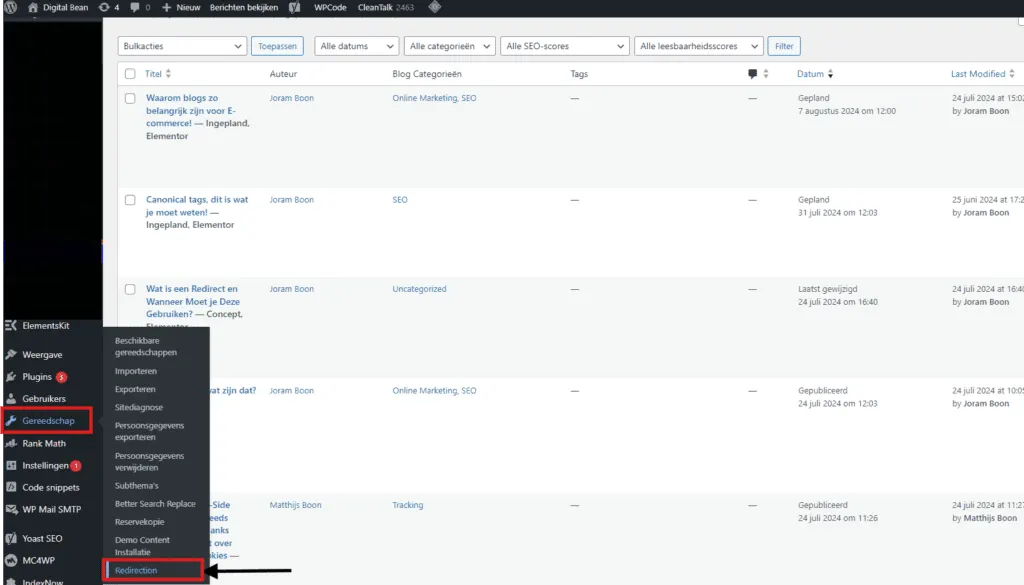
Step 3: Set up the redirect in your CMS
- Via a CMS (such as WordPress):
- Go to the 'Redirects' tab in the left-hand menu bar and enter the old URL and the new URL. Select the redirect type (301 or 302) and save your changes.

Step 4: Test the redirect to check it's working correctly
Make sure the redirect is set up properly by entering the old URL in your browser. You should be automatically sent to the new URL. Use tools such as Google Search Console to check there are no errors.
Tools you can use!
- Yoast SEO plugin: This plugin makes it easy to set up redirects without any technical knowledge.
- Google Search Console: Use this to monitor your redirects and spot any issues.
- Redirect checkers: Online tools such as redirect-checker.org help you confirm your redirects are working properly
To sum up…
Using redirects matters hugely for the SEO and overall user experience of your e-commerce website. Here are the key points:
- Redirects help your customers navigate smoothly through your site.
- Redirects help you hold onto your valuable search engine rankings.
- Regularly checking and updating your redirects helps you avoid 404 errors.
- Use 301 redirects for permanent moves and 302 redirects for temporary moves.
Ready to give your e-commerce website a serious boost? Book a free call with us at Digital Bean.
We're happy to help with personal tips and expert support to optimise your online store and grow your online success.
Book your call today and discover the possibilities!