Are You Making These 20 Common SEO Mistakes?
 Joram BoonSEO and content specialist
12 June 2024 · updated 26 September 2026
Are you sure your online store is performing at its best in the search results? You might think you've set everything up correctly, but you're still stuck with disappointing visitor numbers and low conversions.
What if I told you that you might be making one of the many common SEO mistakes without even realising it?
These aren't small slip-ups, they're mistakes that can seriously damage your website's visibility and effectiveness. The good news is that you can fix these SEO problems easily, but you obviously need to recognise them first.
That's why in this blog we'll cover the 20 most common SEO mistakes online stores make and how to avoid them. Learn how to optimise your website so you can finally achieve the visibility and success you deserve. Let's get started!
In short…
- Make sure every page has a unique, relevant meta title and description so search engines and users know what the page is about.
- Use keywords naturally within your content without overdoing it, to avoid search engine penalties.
- Use the right H1, H2, H3 tags for a logical, readable structure to your content, which helps both SEO and the user experience.
- Link relevant pages within your website to each other, to help both users and search engines understand and navigate your site's structure.
- Make sure you have good alt text and compressed images, to improve visibility in search engines and shorten the page's load time.
- Avoid duplicate content by writing unique descriptions that are both informative and appealing for users.
- Put relevant, useful copy on your category pages to improve visibility and give users the information they need.
- Improve navigation and the user experience by adding breadcrumbs, so users can easily navigate back to higher-level categories.
- Create categories for brands and product types to optimise the structure and visibility of your website.
- Keep your sitemap up to date and your robots.txt file correctly configured, to help search engines crawl and index your website efficiently.
- Link to trustworthy external sources to enrich your content and boost your authority.
- Use short, clear, descriptive URLs that contain keywords and reflect the page's content.
- Use natural, relevant anchor text for both internal links and backlinks to boost the effectiveness and credibility of your links.
- Set up redirects correctly after moving pages, to avoid broken links and a poor user experience.
- Avoid buying poor-quality backlinks and focus on earning quality backlinks by creating valuable content and building relationships with other websites.
- Write content that adds value for the user and is well optimised for search engines.
- Optimise for search engines, but always keep the user experience as your priority.
- Understand and apply your target audience's search intent so you can better meet their needs and questions.
- Pay attention to technical SEO elements such as site speed, mobile-friendliness and security to improve your website's overall performance.
- Avoid chasing quick results without a clear strategy, and work towards sustainable SEO practices instead.
1. Not filling in a meta title and description
Not filling in meta titles and descriptions is a common SEO mistake that can seriously harm your website's visibility in search engines.
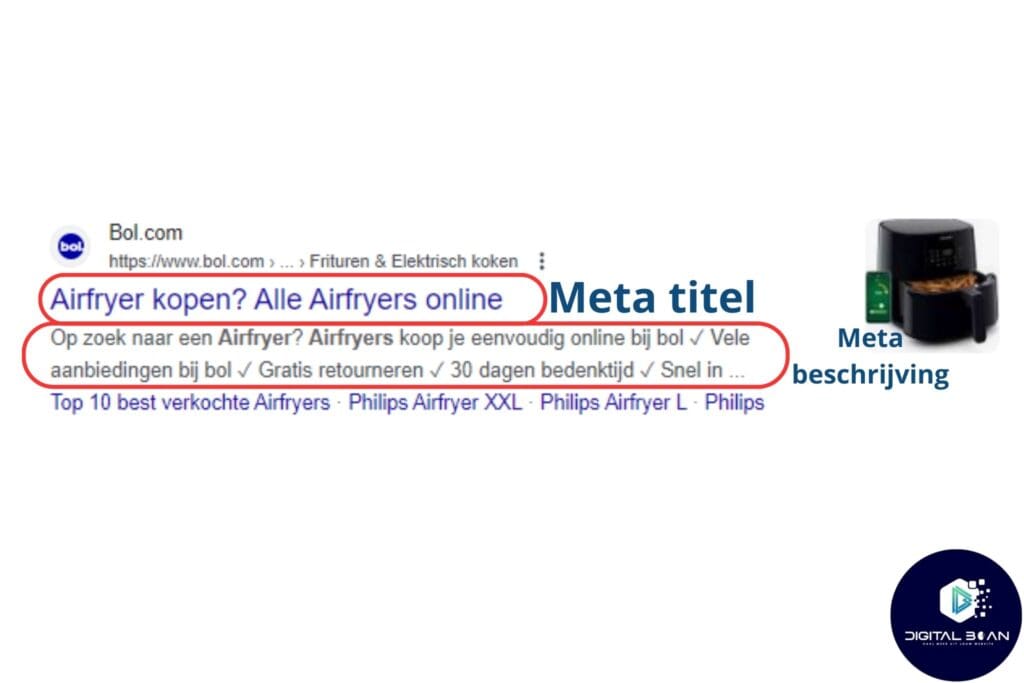
Meta titles and descriptions are the first impression users get of your website in the search results. You can really think of it as a roadside sign. It needs to make clear what the page is about.
Without the meta title tag and meta description, you can miss out on plenty of clicks and considerably reduce the odds of search engines indexing and ranking your page correctly.
How to fix this!
Filling in meta titles and descriptions doesn't take much more than a bit of creativity and knowledge. Here are the steps you can follow to do this properly:
1. Write unique, relevant meta titles:
- Keep the length between 50 and 60 characters to make sure the full title is visible in the search results.
- Put your most important keyword at the start of the title.
- Make sure the title makes clear what the page is about and is appealing to users. Use power words and questions to make people curious. Here's a list of 161 power words!
Example: if you have a page about "SEO tips for e-commerce," a good meta title could be: "10 Practical SEO Tips for E-commerce You Didn't Know About" Here 'practical' is a power word, and the "you didn't know about" bit makes you curious and gets you clicking.
2. Create appealing, informative meta descriptions:
- Keep the length between 150 and 160 characters to stop the description getting cut off in the search results.
- Use a call-to-action (CTA) to encourage users to click through.
- Be specific about what the user will find on the page, and try to strike an emotional chord. Use words such as 'discover', 'best' and other power words to make people curious and prompt them to act.
Example: for that same page about "SEO tips for e-commerce," a good meta description could be: "Discover the 10 best SEO tips for e-commerce to improve your online visibility and attract more traffic to your online store. Learn more!"
Since we're on the subject of SEO tips anyway, check out our blog on this here too!
2. Keyword stuffing
Keyword stuffing, in other words the excessive use of keywords, is an outdated SEO technique that both users and search engines dislike.
Search engines such as Google see this as spam, and have taken a dim view of it for years. So if you overuse keywords and it hurts the readability of your text, Google, as well as your users, will penalise you for it.
For the user, keyword stuffing leads to a poor reading experience, because the text feels unnatural and forced. This makes visitors leave your website quickly, and that sends a signal to Google that your content doesn't satisfy the search query.
As a result, you can also end up ranking lower. On top of that, Google also hands out penalties if it notices you're doing a lot of keyword stuffing.
So the trick is to find the BALANCE between having enough keywords to make clear what the text is about, without so many that it becomes unreadable. It's recommended not to go above a keyword density of 2.5%.
To avoid keyword stuffing, focus on naturally working keywords in. Here are a few concrete steps:
Use synonyms, also known as LSI keywords: instead of repeating the same keyword, use variations and synonyms. This makes your text more readable and more natural. Plus it plays into Google's semantic indexing. 😉 Learn more about LSI keywords here!
Write for the user: create content that's valuable for your target audience. That means informative, engaging copy that answers your visitors' questions.
Optimise with Yoast SEO: this plugin helps you maintain a healthy keyword density. Use the analysis feature to check whether your keywords are spread naturally.
Focus on long-tail keywords: these are more specific and less competitive, so you attract more targeted traffic without overdoing it on keywords. Learn everything about long-tail keywords here!
By applying these techniques, you strike the right balance between search engine optimisation and the user experience, which leads to better results and happier visitors.
3. Not using headings properly (H1, H2, H3, etc.)
One of the most common SEO mistakes is not using subheadings such as H1, H2, H3, and so on properly. This can lead to a poorly structured page, making it hard for both search engines and readers to understand and scan the content (quickly).
Search engines use subheadings to identify the main topics on your page, while readers use subheadings to quickly navigate through the text and find the information they're looking for.

How to build good structure into your content
Make sure every page has just one H1 tag, usually the title of your page or article. This is the most important one, for both search engines and readers. It's the first thing both of them read.
Use H2 tags for the main sections of your text and H3 tags for subsections within each H2 section. This creates a clear hierarchy that improves readability and helps search engines understand the content.
Work relevant keywords into your subheadings naturally, but again avoid the well-known keyword stuffing. This can help your page rank better without getting in the way of the reading experience. To give you an idea, here's an example…
Example structure:
H1: Are You Making These 20 Common SEO Mistakes?
- H2: Not Filling In a Meta Title and Description
- H3: What's the problem?
- H3: How do you fix it?
- H2: Keyword Stuffing
- H3: Why it's harmful
- H3: Alternatives to keyword stuffing
- H2: Not Using Subheadings Properly (H1, H2, H3, etc.)
- H3: Why good subheadings matter
- H3: Tips for effective subheadings.
- H2: Not Filling In a Meta Title and Description
A well-organised text with clear subheadings gives you a better user experience and higher search engine rankings, which ultimately leads to more (and more relevant) traffic and conversions for your online store.
4. Making little to no use of internal links
Plenty of online stores underestimate the importance of internal links. They think a good SEO strategy is all about external backlinks. But internal links are critical for improving your site's SEO and user experience.
Internal links matter for several reasons…
- Spreading authority, also known as 'link juice': internal links help spread the value (also known as 'link juice') that your pages receive from external links. This helps boost the authority of your entire site.
- Crawlability: search engines such as Google use internal links to discover and index new content. A well-linked site makes it easier for search engines to find and understand your content.
- User experience: they help visitors navigate your site easily, which means they stay longer and view more pages.
At Digital Bean we've seen and noticed this too, across various collaborations with e-commerce businesses. A strong internal link structure definitely helps with better SEO performance and makes it easy for Google to navigate through your SEO-friendly website structure.
How do you get started with your internal link game?
- Link from the main category to sub-categories: make sure every main category or top-level page links to all its sub-categories or pages. This helps spread link juice evenly and lets visitors navigate easily.
Link from sub-categories back to the main category and neighbouring categories: every sub-category should link back to its main category and, where relevant, two levels deeper to sub-categories, plus a link to neighbouring categories. This creates a well-connected network (a proper spider's web) of pages.
Category block on product pages: add a category block on product pages. This helps users find related products and makes sure every product page is linked to relevant categories.
5. Not optimising images
Not optimising images on your online store can have serious consequences. Slow loading times can frustrate visitors, leading to higher bounce rates and a worse user experience. This can ruin your conversions, reputation and rankings.
On top of that, visual search engines such as Google Lens are becoming more and more popular. These technologies use alt text and other metadata to understand what's in an image.
If your images don't have descriptive alt text, they miss out on chances to get found in visual searches.

Use alt text:
- Add descriptive alt text to every image to help search engines and visual search tools understand what's in the image.
- Example: "red-leather-handbag-with-gold-buckle.jpg".
Compress your images:
- Use tools such as TinyPNG to shrink images without losing quality, so your website loads faster and becomes more user-friendly.
Use the right file formats:
- JPEG: for photos.
- PNG: for graphics and transparent images.
- WebP: for better compression.

6. Lack of unique product descriptions
Plenty of online stores use generic, copied product descriptions from suppliers. This leads to lower search engine rankings, because search engines reward unique, valuable content. On top of that, this often means buyers miss out on the specific information that could convince them to make a purchase.
Use ChatGPT to create unique, engaging product descriptions. Enter a good prompt such as:
"Write a unique product description for [product name] focusing on the customer benefits of the following features: [key features], and end with an inspiring, clear CTA. Use copywriting techniques, such as tapping into emotion and highlighting benefits, and write in simple, human language"
7. Not putting copy on category pages
Missing copy on category pages is a common SEO mistake. Without this copy, search engines find it harder to understand the page's content, which results in a lower ranking.
On top of that, category pages often lack internal links, which are critical for your website's visibility. Potential buyers also often miss out on the specific information that could convince them to make a purchase.
What can you do about this?
Put at least 300 words of relevant content on every category page. Use H2 and H3 headings to keep the text organised and scannable. These headings help search engines better understand the structure of your content.
Write unique, valuable category descriptions that highlight the key benefits and features of the category.
Work in internal links to related products and sub-categories to improve navigation and help search engines crawl your site.
Avoid keyword stuffing; instead use natural, relevant keywords to optimise the content. Regularly updating and expanding this copy can further improve your SEO performance.
We've seen that a small buying guide or "what to look out for when buying X" works really well and makes things a lot more user-friendly.
8. Not using breadcrumbs
Breadcrumbs are a navigation aid that helps users find their way around your website. They show the user (and the search engine) where they are within the site hierarchy, and make it easy to navigate back.
Without breadcrumbs, visitors can get lost, which leads to a worse user experience and higher bounce rates. This can negatively affect your search engine rankings.

What you can do about this…
Adding breadcrumbs is easy with the Yoast SEO plugin.
Go to your WordPress dashboard, click 'SEO', then 'Search Appearance' and then the 'Breadcrumbs' tab.
Turn on breadcrumbs and configure the settings as you like.
Then add the Yoast breadcrumb shortcode to your theme's header.php or single.php file.
This makes breadcrumbs appear automatically on your pages, improving navigation and boosting usability.
9. Not creating categories for brands + product types
Plenty of online stores miss the chance to be more visible in search engines because they don't create categories for brands and product types.
This is a huge missed opportunity, since there are often hundreds to thousands of searches every month for specific brands and products.
Imagine consumers searching for "Nike running shoes" or "Sonos outdoor speakers". If your website doesn't have separate category pages for these search terms, you're potentially missing out on a lot of traffic, and that's a shame!
In other words, look at which brands you sell and then check, 'are there product categories within this brand?'. If so, you can do some quick keyword research and see which brand + product category combinations people are searching for.
A common mistake in search engine optimisation (SEO) is not having a sitemap and a robots.txt file. Both are critical for search engines such as Google to index your site properly. Without these files, important pages can end up not being found or indexed, which negatively affects your visibility in the search results.
Why do they matter?
Sitemap: a sitemap is an XML file that contains a list of all the important pages on your website. It helps search engines understand which pages exist and how they're connected to each other. This supports more efficient, more complete indexing of your site.
Robots.txt: this file gives search engines instructions about which parts of your site they may or may not crawl. This helps save resources and stops irrelevant or sensitive parts of your site from getting indexed.
Creating a sitemap:
Use tools: tools such as Yoast SEO (for WordPress), Screaming Frog, or online sitemap generators can automatically generate a sitemap for your website.
Step by step:
- Go to your SEO tool or sitemap generator.
- Select the option to create a sitemap.
- Check the generated sitemap for completeness and accuracy.
- Save the sitemap as an XML file.
Submitting it to Google:
- Log in to Google Search Console.
- Go to the 'Sitemaps' section.
- Add the URL of your sitemap (for example: https://www.yourwebsite.com/sitemap.xml).
- Click 'Submit' to submit your sitemap.
Creating a robots.txt file:
Creating a robots.txt file takes a bit more skill, but it's definitely not rocket science. Google has even put together its own document on it, which you can find here. To make it as clear as possible, we've picked a video that walks you through it step by step:
11. Not linking to external sources
Not linking to external sources is a common SEO mistake that can reduce your website's trustworthiness and authority.
When you don't use external links, your content seems less credible because you're not showing where your information comes from. This makes it hard to work out how you arrived at this information, and whether it's even true.
So don't be too hesitant to add an external link to your blog content now and then. Especially when you're making a claim or citing a scientific finding.
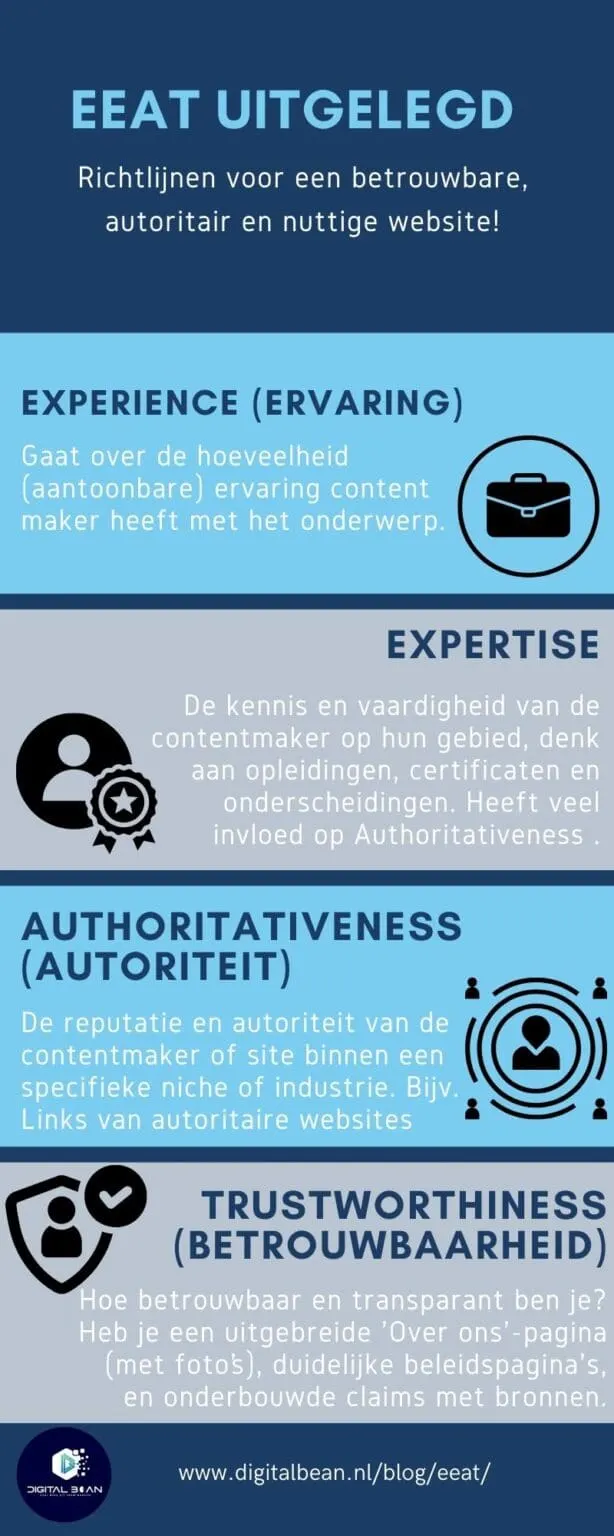
It all comes down to Google's E.E.A.T. (Experience, Expertise, Authoritativeness, and Trustworthiness), a few core points Google likes to see reflected in your content and your online reputation. It wants to see real experience, proof that you're an expert, authority within your sector or niche (backlinks matter for this), and that you're trustworthy (linking to external sources, among other things, matters for this). We've explained E.E.A.T. in full here.
We didn't just make these tips up out of thin air. Check out Yoast's blog on outbound links for more insight (and a bit of confirmation that we're right 😉).
By adding external links, you improve your SEO and show that you offer reliable information. That's how you become an authority in your niche and build trust with your readers.
12. Not using an SEO-friendly URL
An SEO-friendly URL matters for both search engines and users. Search engines look at the URL to understand what a page is about and where it sits within the website. A clear, relevant URL helps search engines index the content better and understand the website's structure more easily.
Users also secretly pay a bit of attention to the URL to quickly see what the page is about. A messy, long URL with unnecessary parameters can be confusing, and can still knock users' trust a little.
Create SEO-friendly URLs by following these steps:
- Keep it short and relevant: use, for example, www.example.com/red-shoes instead of www.example.com/p1234.
- Use keywords: work in keywords, such as www.example.com/seo-friendly-url.
- Avoid special characters: use only letters, numbers and hyphens.
- Use hyphens: for example www.example.com/red-shoes instead of underscores.
- Remove stop words: keep the URL concise, for example www.example.com/seo-tips.
- Use lowercase letters: avoid capital letters, for example www.example.com/red-shoes.
- Limit parameters: avoid complex parameters such as ?id=1234g5hshdzb.
This improves both search engine indexing and the user experience. Here's a quick example:

13. Using unnatural anchor text for internal links and backlinks
Using unnatural anchor text can significantly reduce the effectiveness of your internal links and backlinks. This problem happens when you use overly optimised, exact-match keywords as anchor text, which makes the links feel unnatural to both readers and search engines.
With the Helpful Content Update from September 2023, Google has shifted its focus to the context around a link. This means it's not just about the anchor text itself, but also about the relevant content surrounding it.
What you can do about this
Use natural, varied anchor text. Make sure the text around the link is relevant, and avoid keyword stuffing. Write for people, not machines: let the anchor text fit naturally into the sentence.
Mix exact-match keywords with descriptive terms such as "see here" or "read more." Use synonyms and related terms to create variation.
Focus on the value for the user: place links where they're useful and provide more information. With the September 2023 Helpful Content Update, the context around links matters more than ever, so make sure your links are natural and relevant.

14. Not setting up a redirect after moving a web page
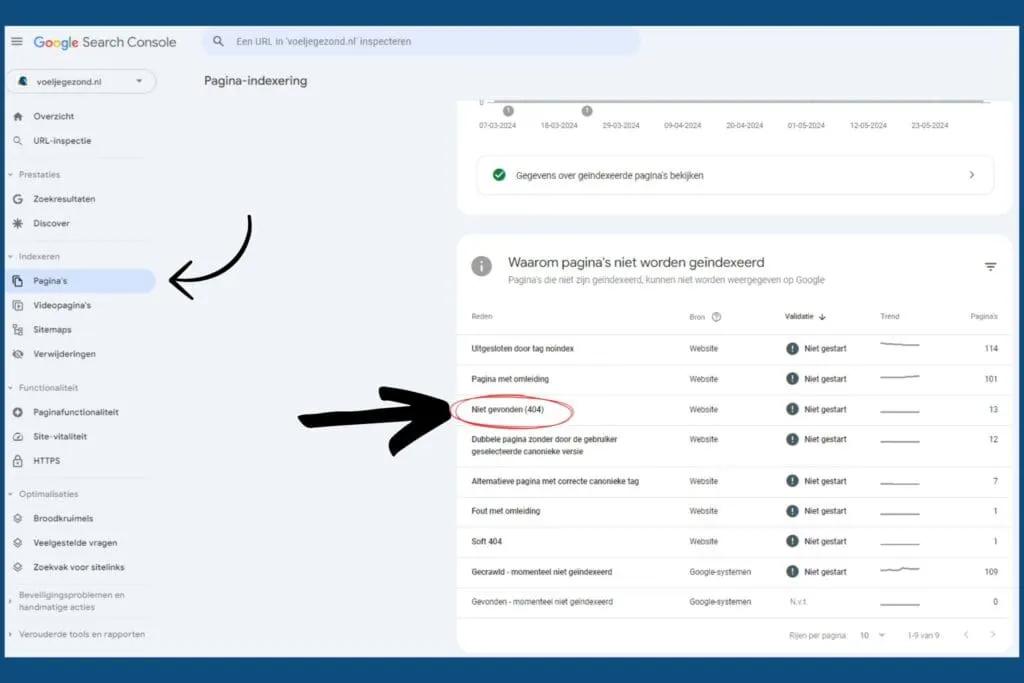
You've moved or deleted a web page without setting up a redirect. Unfortunately we see this happen a lot, and it can really dent your SEO. Users get shown a 404 error, which sends them back to the search results, a bad sign for search engines.
Search engines see this as a poor user experience, which negatively affects your ranking. In short, without redirects you lose both visitors and rankings.
But the solution is really simple…
Fortunately, setting up a redirect is easy. Use a 301 redirect to automatically send visitors and search engines to the new location of your page. You can do this with tools such as Yoast SEO for WordPress, or in Lightspeed under settings > website settings > and then redirects in the menu bar on the left of the screen.
Regularly check your website for 404 errors with Google Search Console under the 'Indexing' heading, and make sure all your redirects are working properly. By following these steps, you keep your visitors happy and preserve your SEO value.
Haven't set up Google Search Console yet? Check out our blog on setting up GSC.
15. Buying or getting poor-quality backlinks
Buying thousands of backlinks for €100 might look like a quick way to improve your SEO, but it can actually damage your website. Poor-quality backlinks often come from irrelevant or even harmful websites, which search engines such as Google penalise.
This can result in a lower ranking, or even a penalty. Poor-quality backlinks offer no value and can seriously damage the trust and authority of your site.
Quality matters a lot more than quantity, especially now that search engines are getting better and better at spotting unnatural link patterns.
So what can you do instead?
Focus on earning backlinks of genuine quality. That means links from relevant, trustworthy websites that have authority in your niche or industry.
Create content that other people and sites genuinely want to share. Build relationships with influencers and bloggers within your industry. Guest blogging on respected sites is also an effective strategy. It takes more time and effort, but quality backlinks have a much bigger positive impact on your SEO than thousands of poor-quality links.
Think quality over quantity: a single link from a trustworthy source can be worth more than a thousand links from a thousand bad websites. The image below from Ahrefs explains it best.

16. Poor-quality or thin content
Poor-quality or thin content is one of the biggest pitfalls for online stores. Content that's superficial, poorly written or not relevant leads to low engagement and high bounce rates (people leaving the page straight away).
Search engines such as Google recognise and penalise thin content, which leads to lower rankings. Users who don't find what they're looking for leave your site quickly, which negatively affects the overall user experience.
A lack of depth and value in your content can also damage your audience's trust, which ultimately results in lower conversions and, in the end, lost revenue.
How you can avoid this:
- Do thorough research into your target audience: understand their needs and interests.
- Write in-depth, informative content: offer value and answer your visitors' questions.
- Use at least 300 words per page: make sure there's enough depth.
- Use a clear structure: use subheadings, bullet points and images.
- Work in relevant keywords naturally: avoid keyword stuffing.
- Check and update your content regularly: make sure the information stays current.
- Use tools such as LanguageTool.org: for grammatical accuracy and readability.
- Monitor performance with Google Analytics: identify which content performs well and optimise it.
Want more in-depth SEO writing tips? Head over to our blog on this!

17. Over-optimising for search engines and not thinking about people
Over-optimisation happens when you place too much emphasis on search engine algorithms and ignore the user experience. Think overly large menus, excessive use of keywords (there it is again, keyword stuffing), and unnatural text.
For example, a page stuffed with keywords such as "buy cheap shoes", "order shoes online", "shoes sale" can be annoying and hard to read for visitors.
Too many internal links or overly extensive navigation can also be confusing. This leads to higher bounce rates, lower customer satisfaction and ultimately worse search results, because search engines now also pay attention to the user experience.
It's all about balance between SEO and the user experience.
Focus on a balance between SEO and usability. Use keywords naturally and make sure your content genuinely gives your audience something of value.
Keep your menus and navigation clear and simple, so users quickly find what they're looking for. Limit internal links to relevant, useful references. Write for people, not machines. Aim for smooth, readable copy and use keywords naturally.
Test your website's user experience regularly and make adjustments where needed. This improves not just your rankings, but also the satisfaction and return rate of your visitors.

A common SEO mistake is ignoring users' search intent. Search intent refers to the goal a user has when they type in a search query.
By not understanding search intent, you risk your content not matching what your audience is actually searching for.
That wastes a lot of effort put into creating content, which then ends up ranking low because it isn't what people are searching for with that particular keyword.
Here's how to work out the search intent quickly and easily!
Understanding and applying search intent is critical for effective SEO. Follow these steps to quickly work out the search intent:
- Analyse the search results: look at the top results for your target keywords. Note the types of pages (informational, commercial, navigational, transactional).
- Use Google autocomplete: type your keyword into Google and look at the suggestions it gives.
- Assess the content: look at the content of the top results and note what kind of information is being shared.
- Look for 'People also ask': look at the questions Google shows in the search results. This gives you insight into related search intents.
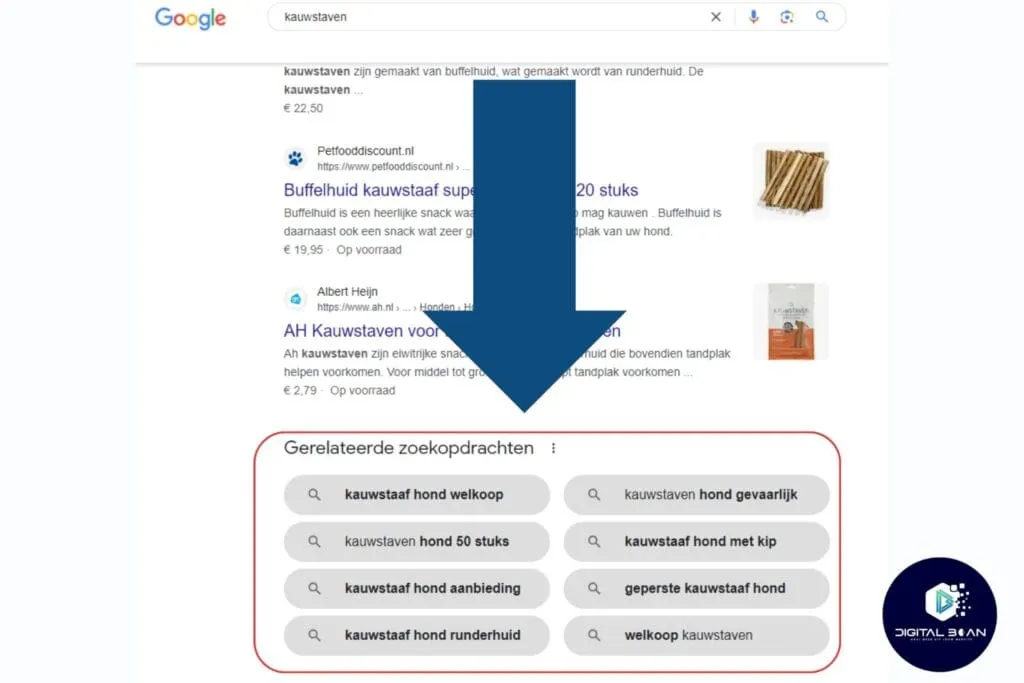
- Check related searches: scroll to the bottom of the search page and look at the related searches.
Want to learn more about search intent? Learn more here!
19. Neglecting technical SEO
Ignoring technical SEO can really hurt your website. Think slow loading times, badly functioning mobile versions and a chaotic site structure. These problems make it hard for search engines and visitors alike to find and navigate your site.
Visitors have no patience for a slow or hard-to-navigate site, so they leave quickly. That in turn sends bad signals to search engines too, because visitors go back to the search results. The result is that search engines rank you lower.
Here's what you can do to optimise this…
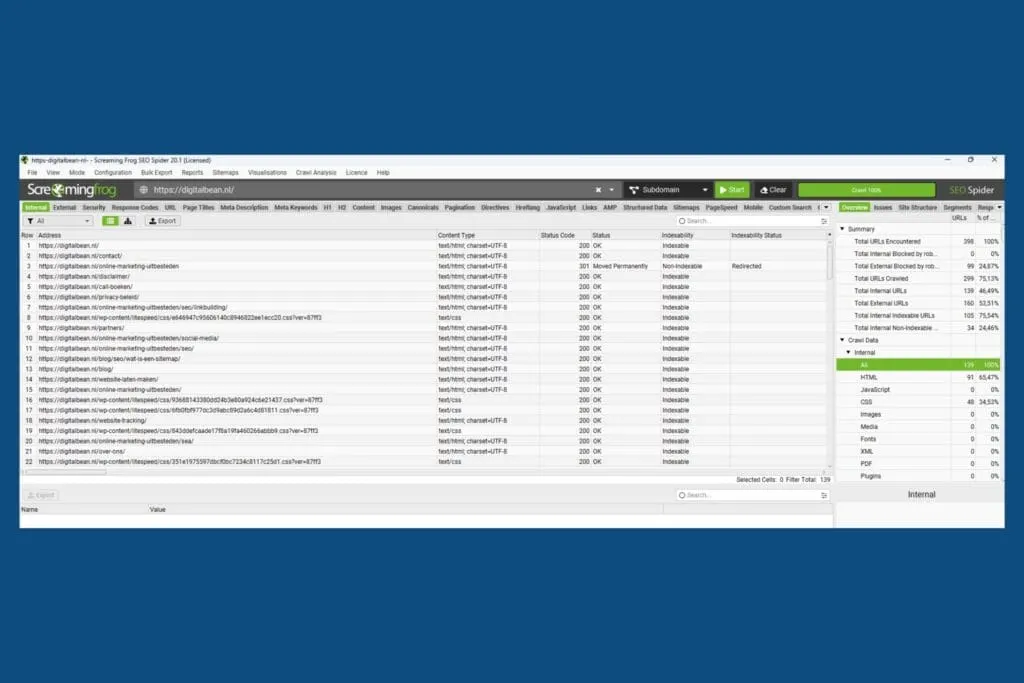
Start with a thorough technical SEO check. Use handy tools such as Google Search Console, Screaming Frog (FREE up to 500 URLs), and PageSpeed Insights to see where your problems lie.
Speed up your website by compressing images, removing unnecessary code (better to have a web developer do this) and using caching.
Make sure your site looks and works well on mobile devices. Make your site structure logical and clear, with a sensible layout and good internal links.
Add an XML sitemap and make sure your robots.txt file is set up correctly. Keep checking and adjusting regularly.
Need help with this? Digital Bean is ready to help you!
20. Starting SEO without a goal and chasing quick results
Plenty of e-commerce businesses start doing SEO without clear goals and expect fast results.
Without a strategic plan, there's no direction, which results in improvised actions that have little long-term effect.
SEO isn't a quick fix; it takes time and consistency to achieve lasting results. Unrealistic expectations can also lead to over-optimisation and other mistakes that can actually harm your ranking.
How can you avoid this?
SEO is an ongoing process that never really stops. Start by setting clear, measurable goals and develop a long-term strategy.
SEO is a bit like a snowball: it takes time to build momentum, but over time it grows exponentially. Consistent effort in improving content, technical optimisations, and link building will gradually lead to better rankings and more traffic.
Use tools to measure your progress and be patient. By following a sustainable SEO plan, you build a solid foundation for lasting success in search engine optimisation.

Want help building an effective SEO plan?
Book a free, no-obligation consultation with Digital Bean and find out how we can help you.
Everything summed up
And there you have it, the 20 most common SEO mistakes. By paying attention to both the technical side and the content side of search engine optimisation, you can make sure your website performs better in the search results and offers a better user experience.
Once more, all the SEO problems in one list:
- Filling in meta titles and descriptions
- Using keywords naturally
- Proper subheading structure
- Internal links
- Optimised images
- Unique product descriptions
- Relevant category pages
- Using breadcrumbs
- Good category structure
- Up-to-date sitemap and robots.txt
- Links to external sources
- SEO-friendly URLs
- Natural anchor text
- Correct redirects
- Quality backlinks
- High-quality content
- Balance between optimisation and user focus
- Understanding search intent
- Long-term strategy
- Optimising technical SEO
Want to really grow your online store and leave your competitors behind? Let us help you avoid these common SEO mistakes and maximise your online visibility. At Digital Bean we believe in the power of tailored, strategic optimisation.
Book a free consultation here and find out how we can turn your online store into an SEO champion.